
A PENCOM Compliance Certificate only does its job if the person checking it can confirm it is real. Procurement officers, banks, and partner organisations increasingly run verification checks before accepting a PCC. A certificate that cannot be verified online, regardless of how legitimate it looks on paper, raises questions your business should not have to answer in the middle of a bid evaluation.
This article explains how PENCOM certificate verification works, where to do it, what a failed check usually means, and how to resolve it.
Obtain Your PENCOM certificate
Let us help you obtain your PENCOM Compliance Certificate quickly and hassle-free. Our experts provide reliable support throughout the application process, ensuring you meet all requirements and remain compliant.
What Is a PENCOM Compliance Certificate?
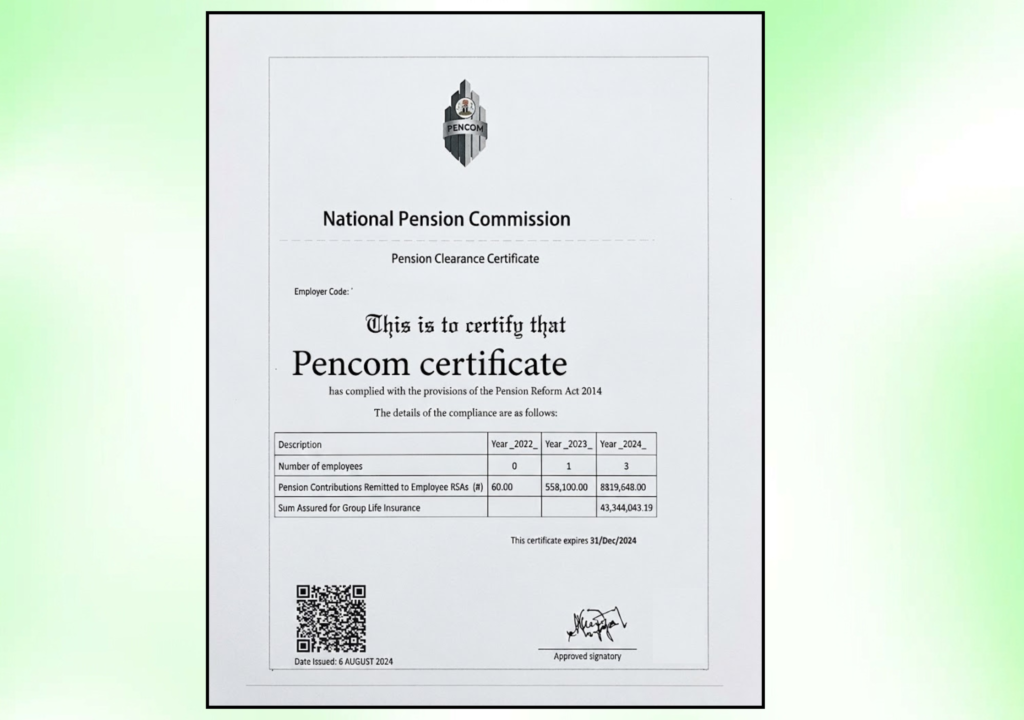
Before getting into verification, a quick recap. The Pension Compliance Certificate is issued annually by the National Pension Commission to companies that have met their obligations under the Pension Reform Act 2014. It confirms that a company is registered under the Contributory Pension Scheme, has enrolled its employees with a Pension Fund Administrator, and has been remitting contributions correctly.
The certificate is valid until the 31st of December of the year it is issued. A company that received its PCC in March still needs to renew by end of year, and anyone verifying the certificate after that date will find it expired.
Where to Verify a PENCOM Certificate
PENCOM maintains an official public list of organisations that have been issued compliance certificates. This list is published on PENCOM’s website under the Pension Compliance section and is updated as new certificates are issued.
The direct verification route is through PENCOM’s online portal at pcc.pencom.gov.ng. This is the same portal used to submit PCC applications. Verification can be done by entering either the organisation’s RC number or its PENCOM employer code to confirm whether a valid certificate exists on record.
As of April 1, 2026, PENCOM requires all applications for the Pension Compliance Certificate to be submitted through this online portal. The move to a fully digital system means the portal is now the single authoritative source for both applications and verification.

How to Run a Verification Check
The process itself is straightforward once you are on the right platform.
Go to pcc.pencom.gov.ng and look for the verification or public search function. Enter the company’s RC number as registered with the Corporate Affairs Commission, or its PENCOM employer code if you have it. The system will return whether a valid PCC exists for that organisation, along with the certificate number, issue date, and expiry date.
PENCOM also publishes downloadable PDF lists of all organisations issued PCCs for each year. These lists are available on the main PENCOM website at pencom.gov.ng and are updated periodically. If you want to cross-check a certificate without logging into the portal, downloading the relevant year’s list and searching for the company name is an alternative route.
Why a Certificate Might Fail Verification
Several things can cause a legitimate-looking certificate to return a negative result during verification.
The Certificate Is From an Outdated Year
This is the most common reason. A company may present a 2024 PCC in a 2025 bid without having renewed. Since the certificate expires on December 31 of the year it is issued, a prior year certificate will not appear as valid during a current-year check.
Always confirm the year printed on the certificate matches the current procurement cycle before accepting it.
The Wrong Verification Platform Was Used
There is some confusion around which web address to use for PENCOM-related checks, partly because multiple guides online point to different domains. Using a third-party aggregator or an outdated link can return a null result for a certificate that is perfectly valid.
If verification fails, the first step is to confirm you are using pcc.pencom.gov.ng, the official PENCOM portal, rather than a third-party site.
The Company Name or RC Number Was Entered Incorrectly
PENCOM’s database matches on exact details. A small typo in the RC number, or a slight variation in how the company name was entered, can cause the system to return no result even when a certificate exists.
Try entering the RC number rather than the company name, since RC numbers are fixed and less prone to variation. If the RC number also returns nothing, move to the downloaded PDF list as a secondary check.
The Certificate Was Not Issued in the First Place
Fraudulent compliance certificates do exist. In Nigeria’s procurement market, some vendors present forged documents to meet tender requirements. If a certificate fails every verification route, including the portal and the PDF list, there is a reasonable chance the document is not genuine.
At this point, the appropriate step is to contact PENCOM directly with the certificate number and the company’s details for official confirmation.
A Database Delay After Recent Issuance
Certificates issued very recently, particularly in the days immediately after approval, may not yet appear in the public-facing database. PENCOM’s portal and published lists are updated periodically rather than in real time.
If a company insists their certificate was just issued and verification is failing, ask for the official certificate document from PENCOM with the approval timestamp. A brief delay between issuance and public database update is possible, but this should resolve within a few working days.
Obtain Your PENCOM certificate
Let us help you obtain your PENCOM Compliance Certificate quickly and hassle-free. Our experts provide reliable support throughout the application process, ensuring you meet all requirements and remain compliant.
Verification Outcomes at a Glance
| Verification Result | Likely Explanation | What to Do |
|---|---|---|
| Certificate found, current year | Valid and confirmed | Accept the certificate |
| Certificate found, expired year | Certificate not renewed | Ask for current year PCC |
| No result found, correct portal used | Company may not have a valid PCC | Contact PENCOM directly to confirm |
| No result found, wrong portal used | Platform issue, not certificate issue | Rerun check on pcc.pencom.gov.ng |
| No result found on any platform | Possible fraud | Contact PENCOM with certificate number for official verification |
| Result delayed after recent issuance | Database update lag | Wait 2 to 3 working days, then recheck |
Verifying as a Third Party vs Confirming Your Own Certificate
The process is the same whether you are verifying someone else’s certificate or confirming that your own shows up correctly after issuance.
For companies that have just received a PCC and want to confirm it is publicly visible before submitting a bid, running a self-check on the portal is worth doing. If your certificate does not appear, contact PENCOM before submission rather than assuming the system will resolve itself during the evaluation period.
For procurement officers and partner organisations running third-party checks, the downloaded PDF lists from pencom.gov.ng are useful for bulk checks, since they allow you to verify multiple companies without running individual portal searches.
Frequently Asked Questions
Where exactly do I verify a PENCOM certificate?
The official verification portal is pcc.pencom.gov.ng. PENCOM also publishes downloadable lists of certified organisations on its main website at pencom.gov.ng under the Pension Compliance section. Both routes draw from the same underlying data.
Can a PENCOM certificate be faked?
Yes, fraudulent compliance certificates have appeared in Nigeria’s procurement market. The only reliable way to confirm a certificate is genuine is to verify it directly through PENCOM’s official channels rather than relying on the physical document alone. If a certificate cannot be verified through the portal and the PDF lists, contact PENCOM directly with the certificate number.
How long after approval does a certificate appear in PENCOM’s database?
There can be a short delay of a few working days between when PENCOM approves a certificate and when it appears in the public-facing database. If a freshly issued certificate is not showing up, wait two to three working days and recheck before escalating to PENCOM.
What details do I need to verify a certificate?
You need either the company’s RC number as registered with the CAC or its PENCOM employer code. The certificate number itself can also be used. Company names alone are less reliable because slight differences in how a name is listed can produce a no-result even when the certificate exists.
Can I verify certificates for multiple companies at once?
Yes. PENCOM publishes annual PDF lists of all organisations issued PCCs for each year. These lists are available for download from pencom.gov.ng and can be searched by company name or employer code without needing to run individual portal queries.
What should I do if I believe a certificate presented to me is fake?
Do not accept the document on the basis of the physical certificate alone. Run a check on pcc.pencom.gov.ng and cross-reference with the published PDF list. If the certificate cannot be verified through either route, contact PENCOM directly with the certificate number and the presenting company’s details. In a procurement context, document this process and flag the concern through your organisation’s procurement or legal team.
Conclusion: Verification Takes Two Minutes and Protects Your Organisation
A PENCOM Compliance Certificate takes weeks to obtain correctly and costs nothing to verify. Procurement teams that skip the verification step take on real risk, since a company that presented a forged or expired certificate is almost certainly non-compliant in other areas too.
If you are presenting your own certificate for a bid, run a self-check on the portal before submission. If you are on the receiving end of one, two minutes on pcc.pencom.gov.ng is enough to confirm whether the document in front of you reflects a company that has actually met its pension obligations.
Obtain Your PENCOM certificate
Let us help you obtain your PENCOM Compliance Certificate quickly and hassle-free. Our experts provide reliable support throughout the application process, ensuring you meet all requirements and remain compliant.