
Every year, organisations registered under the Contributory Pension Scheme run into the same bottleneck. The PENCOM Pension Clearance Certificate expires on December 31, and without a valid one, bidding for government contracts is off the table. Banks are also now requiring it before engaging certain service providers.
The renewal process is not complicated, but it catches businesses off guard because the documents have to be exact. This guide covers everything you need to prepare and the steps to follow on the e-PCC portal.
Obtain Your PENCOM certificate
Let us help you obtain your PENCOM Compliance Certificate quickly and hassle-free. Our experts provide reliable support throughout the application process, ensuring you meet all requirements and remain compliant.
What Is a PENCOM Pension Clearance Certificate?
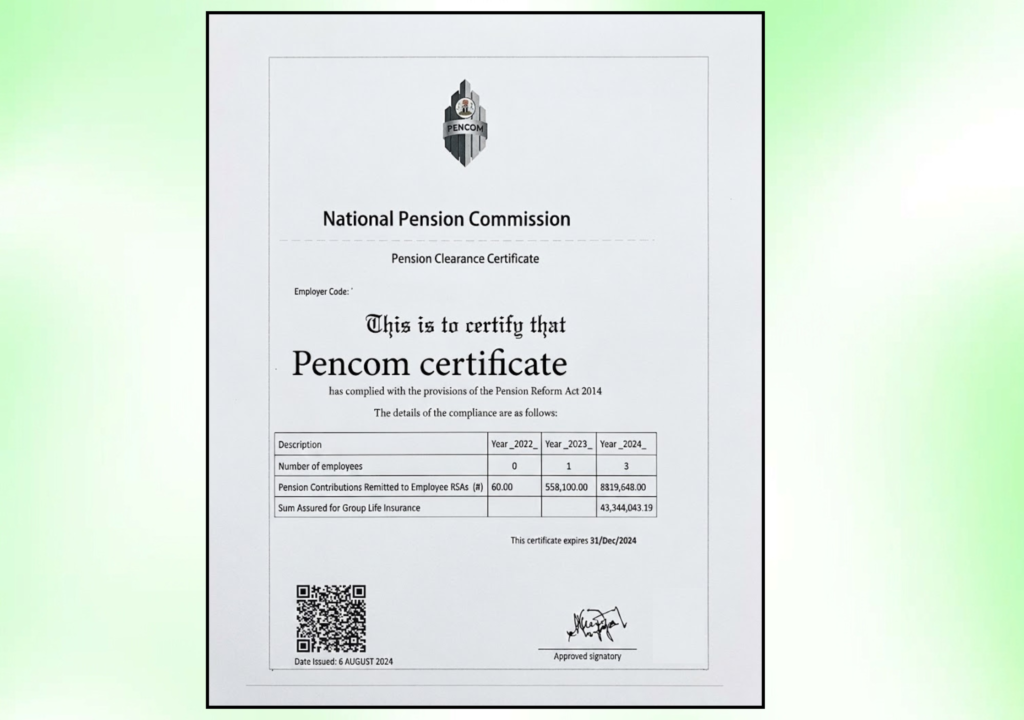
The Pension Clearance Certificate, abbreviated as PCC, is an official compliance document issued by the National Pension Commission confirming that your organisation has met its pension obligations under the Pension Reform Act 2014. It is renewed annually, expiring on December 31 of each year, and the process is free.
The certificate is mandatory for suppliers, contractors, and consultants bidding for contracts from Federal Government Ministries, Departments, and Agencies. Since 2025, PenCom also directed Licensed Pension Fund Operators to demand the PCC from service providers before engaging them, which means the requirement now extends well beyond government contracting alone.
Who Needs to Renew?
Renewal applies to any employer who already holds a PCC and needs to maintain valid compliance for the new year. The renewal process goes through the same e-PCC portal used for first-time applications, accessible at pcc.pencom.gov.ng.
Under the Pension Reform Act 2014, employers with five or more employees are required to participate in the Contributory Pension Scheme and obtain the certificate annually. Even companies with fewer staff sometimes apply to strengthen their compliance profile when bidding for contracts.

Documents Required for PENCOM Certificate Renewal
Getting the documents right before you open the portal saves you from the back-and-forth queries that delay most applications. Here is what you need to prepare.
| Document | Detail |
|---|---|
| CAC Certificate of Incorporation | Scanned copy, legible, with correct business name |
| MEMART (Memorandum and Articles of Association) | Required for limited companies |
| Status Report or Form CAC 1.1 / BN 1 | For business names; older companies may need Form CAC 2A or 7A |
| Tax Identification Number (TIN) Printout | Official FIRS TIN printout, not a handwritten copy |
| Company profile | Describes the nature of the business and details of key personnel |
| Contribution schedules | Three years of monthly pension remittance records in the official Excel template downloaded from the PenCom portal |
| Previous PCC (if renewing) | Used as proof of remittances for earlier years covered by that certificate |
| Bank details of at least one director | As required during profile completion |
| Valid ID of at least one director or proprietor | National ID, passport, or driver’s licence |
| Employer Code | Issued by your Pension Fund Administrator, required to log into the portal |
For companies less than three years old, submit proof of remittances from the date of incorporation rather than the full three-year history.
One document that causes more delays than any other is the contribution schedule. PenCom requires the official Excel template downloaded directly from the portal. Uploading a self-designed spreadsheet will result in a query.
Step-by-Step: How to Renew Your PENCOM Certificate
Step 1: Confirm Your Pension Remittances Are Up to Date
Before opening the portal, confirm that all monthly pension contributions have been remitted to your employees’ Pension Fund Administrators without gaps. PenCom reviews the full contribution history during the verification stage. If remittances are missing for any month, the application will not progress until those payments are made and reflected. Penalties for defaults must also be settled.
Step 2: Gather and Format Your Documents
Download the official contribution schedule template from the e-PCC portal and fill it in accurately for each year required. If you are applying with a 2025 PCC, for example, you need separate schedules for 2023, 2024, and 2025, each uploaded as a separate Excel file.
For each year, the schedule should reflect whether payments were made monthly or as bulk remittances. A January payment, for instance, should show the start month as January, the end month as January, and the number of months as one. A bulk payment covering January to March should show January as the start, March as the end, and three as the number of months. Getting this formatting wrong is a common reason for queries.
Ensure all documents are saved as clear scans, not phone camera photos. File sizes should fall within the portal’s upload limits.
Step 3: Log Into the e-PCC Portal
Go to pcc.pencom.gov.ng. If your organisation already has a portal account from a previous application, log in using your existing credentials. Returning applicants do not need to register again as a new user.
If you have lost access to your account or your registration details have changed, use the portal’s account recovery option or contact PenCom directly.
Obtain Your PENCOM certificate
Let us help you obtain your PENCOM Compliance Certificate quickly and hassle-free. Our experts provide reliable support throughout the application process, ensuring you meet all requirements and remain compliant.
Step 4: Update Your Company Profile
Once logged in, confirm that your company profile is current. This includes your date of incorporation, contact details, website if applicable, and CAC documents. Upload updated documents if anything has changed since your last application. Mismatches between your CAC records and what is on file at PenCom are one of the main reasons applications get queried.
Step 5: Upload Your Contribution Schedules
Navigate to the contribution schedule upload section of the portal. Upload each year’s schedule as a separate Excel file using the official template. For years covered by a previous PCC, you can use that certificate as supporting evidence of payment, entering the remittance amounts as shown on it.
Review each upload confirmation before proceeding. The portal should acknowledge each file successfully before you move to the next stage.
Step 6: Upload Supporting Documents
Upload all the supporting documents listed in the requirements above. This includes the CAC certificate, MEMART or status report, TIN printout, company profile, and valid ID. Confirm that each document is uploaded under the correct field.
Step 7: Review and Submit Your Application
Before submitting, go through the entire application to check for errors. Confirm that business names match exactly across all documents, that the TIN corresponds to the company, and that the contribution schedule figures are consistent with your remittance records.
Once you are satisfied, submit the application for processing by PenCom.
Step 8: Monitor Your Application and Respond to Queries
After submission, PenCom will review the application. If everything is in order, the certificate will be issued. If there is an issue, PenCom will send a query specifying what needs to be corrected or resubmitted.
Log into the portal regularly to check your application status. Respond to any queries promptly. Delays at this stage are usually self-inflicted because applicants do not monitor the portal after submitting.
Step 9: Download and Print Your Certificate
Once approved, the PCC is issued electronically and available for download directly from your portal account. PenCom no longer issues hard copies, so the downloaded digital version is the official certificate.
Print a copy and keep it at your principal business premises. PenCom and law enforcement can request to see it during inspections. Also keep a digital copy alongside your other compliance documents.
Application Process at a Glance
| Step | Action | Watch Out For |
|---|---|---|
| 1 | Confirm remittances are complete and up to date | Gaps in monthly contributions will block approval |
| 2 | Prepare documents and download Excel templates | Only the official portal template is accepted |
| 3 | Log into pcc.pencom.gov.ng | Use existing credentials for renewals |
| 4 | Update company profile | Name and TIN must match CAC records exactly |
| 5 | Upload contribution schedules by year | Each year as a separate file; correct format matters |
| 6 | Upload all supporting documents | File size limits and scan quality affect acceptance |
| 7 | Review and submit | Check for inconsistencies before hitting submit |
| 8 | Monitor portal for queries | Late responses extend processing time |
| 9 | Download and print certificate | No hard copies issued; digital version is official |
Common Mistakes That Delay Renewal
The most frequent reason PENCOM certificate renewals get delayed is inconsistent business names. If your company name appears differently across the CAC certificate, TIN printout, and contribution schedule, the application will be queried.
The second most common issue is uploading contribution data in a custom spreadsheet rather than the official template. The portal will not accept it, regardless of how detailed the data is.
Another error that catches companies out is waiting until late in the year to apply. PenCom processes applications from businesses across the country, and volume increases heavily toward the end of the year as the December 31 expiry approaches. Applying early, ideally in the first quarter, gives you time to resolve any queries before the certificate is urgently needed.
Frequently Asked Questions
How much does it cost to renew a PENCOM certificate?
The certificate is free. PenCom does not charge for issuing or renewing a PCC. If a consultant or third party is helping with the application, their professional service fee is separate and has nothing to do with the certificate itself. No payment should be made to anyone specifically for “the certificate.”
How long does it take to process a PENCOM renewal?
Processing time depends on document accuracy and PenCom’s application volume. Clean applications with no queries typically process within one to two weeks. Applications that receive queries can take significantly longer depending on how quickly the business responds.
When should I start the renewal process?
Start as early as possible in the new year. The certificate expires on December 31, and many businesses try to renew in the fourth quarter when PenCom is dealing with the highest application volumes. Starting in January or February gives you the widest window to resolve any issues without pressure.
What happens if I miss the renewal deadline?
Operating without a valid PCC means you cannot legally bid for or execute government contracts. You also risk account restrictions and reputational damage in business relationships that require compliance documentation. If your certificate has lapsed, apply for renewal as soon as possible and address any outstanding remittances before submitting.
Can I renew if I have employees who recently left the company?
Yes. Your contribution schedules should reflect actual employee counts and contributions per period. If staff numbers changed during the year, make sure the schedule accurately captures the months each employee was active. PenCom verifies this against your PFA records.
What if my Employer Code is no longer working?
Contact your Pension Fund Administrator to confirm your current Employer Code. If the issue is with portal access rather than the code itself, use the account recovery option on the portal or reach out to PenCom directly through the contact details on pencom.gov.ng.
Conclusion: Start Early, Get the Documents Right
PENCOM certificate renewal is not a difficult process. It becomes difficult when businesses leave it late or upload documents that do not match. The application window opens at the start of each year, and the businesses that go through it without drama are the ones that prepare their contribution schedules correctly from the beginning.
The nine steps above cover everything from checking your remittances to downloading your certificate. Follow them in order, confirm your documents are formatted correctly, and monitor the portal after you submit.
Obtain Your PENCOM certificate
Let us help you obtain your PENCOM Compliance Certificate quickly and hassle-free. Our experts provide reliable support throughout the application process, ensuring you meet all requirements and remain compliant.